
Design service-health views that help operators decide what matters, who owns it, and what to do next. Use this guide with your operations team to identify one improvement, assign an owner, and verify the result.
Write the operating question first
A command center dashboard earns its place when it helps someone make a timely decision. Before choosing charts, write the questions an operator must answer at the start of a shift: Which customer services are affected? Is the situation worsening? Who is responding? What action is due next? A dashboard that cannot answer those questions may look impressive while leaving the real coordination work in chat messages.
Choose a specific audience and setting. A wallboard viewed across a room needs fewer, larger elements than an analyst workstation. A service delivery manager reviewing a weekly trend needs a different view from an engineer diagnosing a sudden latency increase. Trying to satisfy every audience on one screen usually creates unnecessary density.
For each proposed widget, record the question, the decision it supports, the source, and the owner. Remove widgets whose only justification is that the data is available. If a chart repeatedly requires a specialist to explain it, simplify its presentation or move it to a diagnostic view where that context belongs.
Build a small service model
Organize the main view around business services and customer journeys. Map each service to its critical dependencies and operational owner. Infrastructure health remains useful, but a server count should not be the only basis for saying that a customer journey is healthy. An application can return errors while its servers remain reachable.
Agree status rules with the service owner. Define healthy, degraded, unavailable, maintenance, and unknown. Unknown deserves an explicit state: missing data is not healthy data. Show when the status was last calculated and which evidence supports it. Use text labels and icons as well as color so the view remains understandable in different viewing conditions.
Keep the first service model manageable. Start with a few critical journeys and document the dependencies that matter for their availability. Do not delay useful reporting until an entire configuration database is perfect. Record uncertain mappings and assign someone to verify them, especially after application changes or ownership transfers.
Separate overview, coordination, and diagnosis
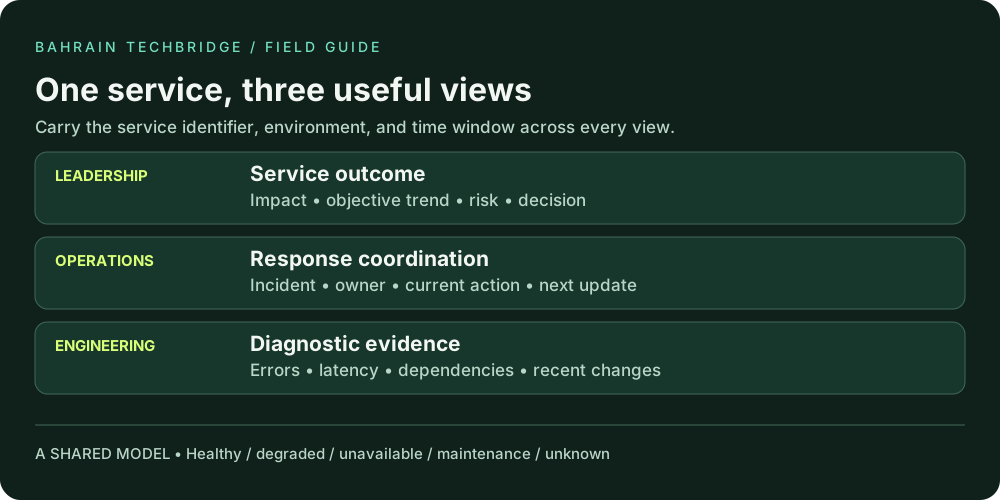
Use three connected views. The leadership view summarizes service availability, current business impact, and significant unresolved risk. The operational view shows active incidents, severity, owner, elapsed time, and the next update. The engineering view provides detailed metrics, logs, traces, and dependency evidence for investigation.
Carry service identifiers, time windows, and environment filters between views. When an operator opens a diagnostic link for a production incident at 14:10, the destination should not silently display a different environment or the previous day. If a tool cannot preserve context automatically, make the expected filter values visible beside the link.
| Audience | Primary question | Useful content |
|---|---|---|
| Leadership | What service outcome is at risk? | Impact, objective trend, risk owner, decision needed |
| Operations | Who is doing what next? | Incident, severity, owner, action, next update |
| Engineering | What evidence narrows the fault? | Errors, latency, resource pressure, dependencies, changes |
Resist copying every diagnostic chart onto the wallboard. A clear path to evidence is more useful than showing all evidence at once. Review which drill-downs responders actually use and maintain those links as part of the service’s operational documentation.
Make every chart honest and readable
State units, reporting period, timezone, and aggregation. A latency chart without a percentile or unit invites misinterpretation. A total incident count without a period is not a trend. Keep comparable graphs on compatible scales where practical, and label deliberate differences so readers do not infer a false comparison.
For user experience, consider tail latency as well as averages. Show request volume beside error percentages so an apparent improvement caused by traffic disappearing is easier to notice. Preserve gaps when telemetry is absent instead of drawing an unbroken line through them. Give data freshness a visible label, especially for sources that update at different intervals.
Choose chart types around the question. Use lines for change over time, ranked bars for comparing categories, and a short table when readers need exact values and ownership. Avoid gauges for every measure: they consume space while often concealing the trend that would explain whether a condition is improving.
Keep critical labels large enough to read in the intended setting. Test long service names and translated labels if relevant to your organization. Do not rely on hover tooltips for essential information on a wallboard or touch device. A color legend is helpful, but status text should remain understandable without memorizing it.
Show the next action, not only the alarm
An active incident row should contain a concise impact statement, severity, accountable response owner, current action, and next update time. A red tile labeled “database warning” may attract attention but does not establish whether customers are affected or whether anyone is investigating. Add enough context to prevent several operators from starting the same work independently.
Make stale coordination information obvious. An incident that has no update by the agreed time should be distinguishable from one with a current action. Avoid automatically treating every late update as a higher technical severity; the dashboard can signal a coordination concern without changing the incident’s impact classification.
Service: Customer payments. Impact: Some submissions are timing out. Owner: Payments response lead. Action: Verify the approved rollback in the affected region. Next update: 14:30 UTC. Evidence: Transaction success checks and the incident record.
For shift handover, add known limitations and unresolved questions to the linked incident record. The dashboard should summarize the operational state, while the record retains the detail and decision history. Keep one authoritative incident record to reduce disagreement between the wallboard and the response channel.
Test failure states before launch
Use a short acceptance exercise with operators from different shifts. Ask them to identify the most affected service, find its owner, and reach relevant evidence. Record where they hesitate or interpret a label differently. This is more useful than asking whether they like the colors.
Simulate an unavailable data source, an expired integration credential, a delayed update, and a service with no traffic. Confirm that each produces an honest display rather than a green default. Test the dashboard under a read-only operator account, because an administrator may see panels or links that ordinary users cannot access.
Check the intended screen sizes and text enlargement. Important content should not disappear behind a horizontal scroll on an operator laptop. A wide diagnostic table may need scrolling, but the service name, status, and action should remain easy to find. Verify that keyboard users can follow links and understand focus placement.
- The service status has a documented rule and named owner.
- Unknown and maintenance states are distinct from healthy.
- Every metric shows its unit and time window.
- Incident rows expose ownership and the next update.
- Diagnostic links retain or clearly describe investigation context.
- Operators can see when data or coordination information is stale.
Keep the dashboard useful after launch
Assign a dashboard owner and a review date. Treat changes to service mapping, status logic, queries, and thresholds as operational changes with a record of what was modified. A view can become misleading gradually as services move, teams reorganize, and data sources change.
During the first month, review the dashboard after each significant incident. Ask which element accelerated a decision, which was ignored, and which suggested the wrong conclusion. Remove unused widgets only after checking why they were unused. A panel may be unnecessary, inaccessible, or simply poorly labeled; those problems need different fixes.
Measure usefulness through practical tasks: time to identify the affected service, time to locate an owner, and whether handover omissions decrease. Use consistent scenarios when comparing revisions. The aim is a shared, trustworthy picture of operations that reduces coordination effort and directs attention to the next meaningful action.
References and application notes
Further reading: Google’s Monitoring chapter discusses data freshness, useful visualizations, and views suited to different audiences. The worksheets, examples, and review plans in this guide are proposed practices to adapt to your service.
All numerical scenarios are illustrative. Agree targets, severity definitions, permissions, and response expectations with your service owners before applying them.